 zZw's Blog
gitlab 安装使用
591 字
3 分钟
gitlab 安装使用
gitlab centos安装
安装依赖包
yum updateyum install perl -yyum install policycoreutils-python -y安装postfix
#新用户激活邮件用到yum install postfixsystemctl start postfix && systemctl enable postfix下载安装包
# 找到机器对应版本下载https://packages.gitlab.com/gitlab/gitlab-cehttps://mirrors.tuna.tsinghua.edu.cn/gitlab-ce
wget https://mirrors.tuna.tsinghua.edu.cn/gitlab-ce/yum/el7/gitlab-ce-8.6.7-ce.0.el7.x86_64.rpmwget --content-disposition https://packages.gitlab.com/gitlab/gitlab-ce/packages/el/8/gitlab-ce-17.11.5-ce.0.el8.x86_64.rpm/download.rpm安装
rpm -ivh gitlab-ce-8.6.7-ce.0.el7.x86_64.rpmrpm -ivh gitlab-ce-17.11.5-ce.0.el8.x86_64.rpm修改配置文件
# 修改/etc/gitlab/gitlab.rb文件,设置external_url为服务器IP或域名vim /etc/gitlab/gitlab.rb
external_url 'http://10.0.0.5'启动服务
gitlab-ctl reconfiguregitlab-ctl startsystemctl enable gitlab-runsvdir.service命令
gitlab-ctl help
/opt/gitlab/embedded/bin/omnibus-ctl: command (subcommand)deploy-page Put up the deploy page 显示部署页面remove-accounts Delete *all* users and groups used by this package 删除所有用户和组upgrade Run migrations after a package upgrade 在软件包升级后运行迁移General Commands: cleanse Delete *all* gitlab data, and start from scratch. 清除所有 GitLab 数据,从头开始 help Print this help message. 打印帮助信息 reconfigure Reconfigure the application. 重新配置应用程序 show-config Show the configuration that would be generated by reconfigure. 显示将通过 reconfigure 生成的配置 uninstall Kill all processes and uninstall the process supervisor (data will be preserved). 终止所有进程并卸载进程监控程序(数据会被保留)Service Management Commands: graceful-kill Attempt a graceful stop, then SIGKILL the entire process group. hup Send the services a HUP. 向服务发送 HUP 信号 int Send the services an INT. 向服务发送 INT 信号 kill Send the services a KILL. 向服务发送 KILL 信号 once Start the services if they are down. Do not restart them if they stop. :如果服务未运行则启动它们,但不会在服务停止后自动重启 restart Stop the services if they are running, then start them again. 如果服务正在运行,则停止它们,然后再次启动 service-list List all the services (enabled services appear with a *.) 列出所有服务(启用的服务前会带有 * 标记) start Start services if they are down, and restart them if they stop. 如果服务未运行则启动,若服务停止则会重启 status Show the status of all the services. 显示所有服务的状态 stop Stop the services, and do not restart them. 停止服务,并且不自动重启 tail Watch the service logs of all enabled services. 实时查看所有启用服务的日志 term Send the services a TERM. 向服务发送 TERM 信号日志
tail -f /var/log/gitlab/nginx/current卸载删除
gitlab-ctl stoprpm -e gitlab-ce
rm -rf /opt/gitlabrm -rf /var/opt/gitlabrm -rf /etc/gitlab默认密码
rootcat /etc/gitlab/initial_root_password访问
中文设置
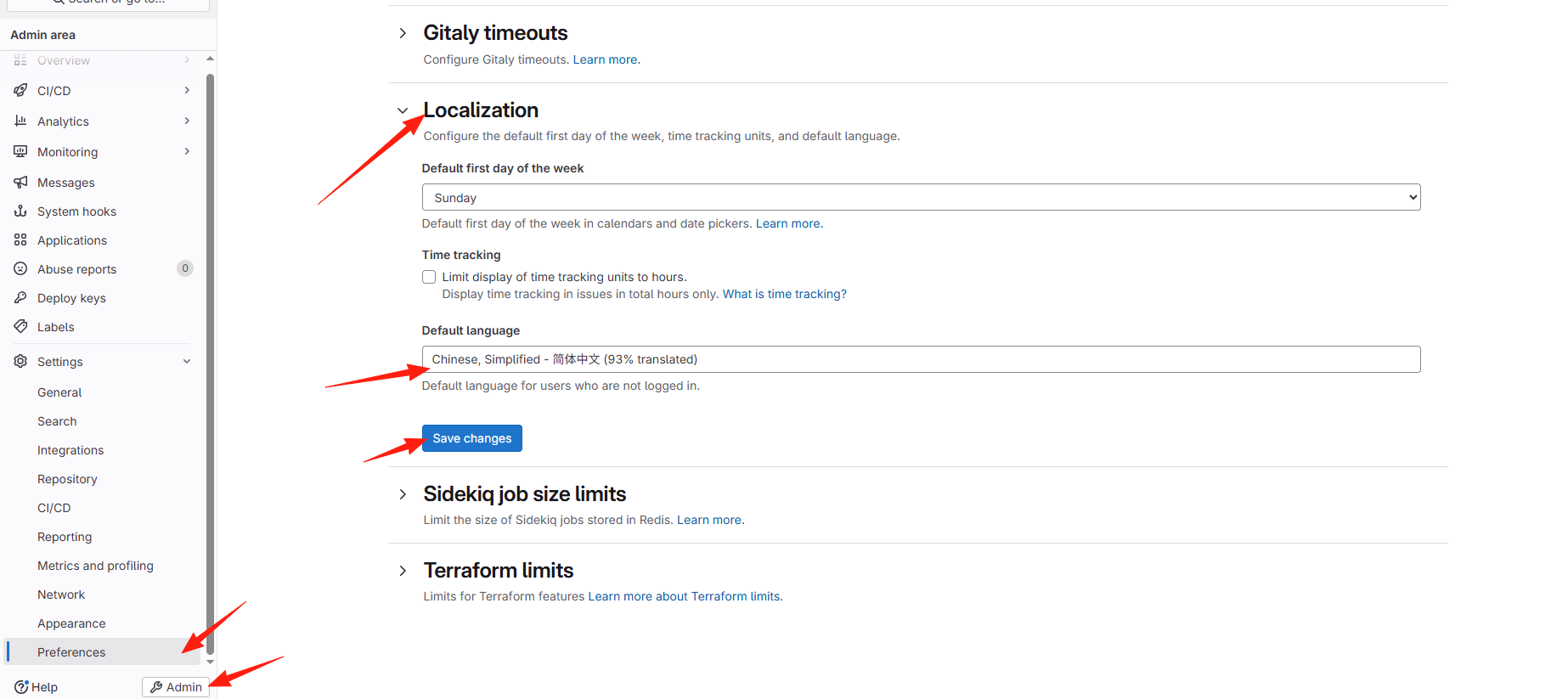
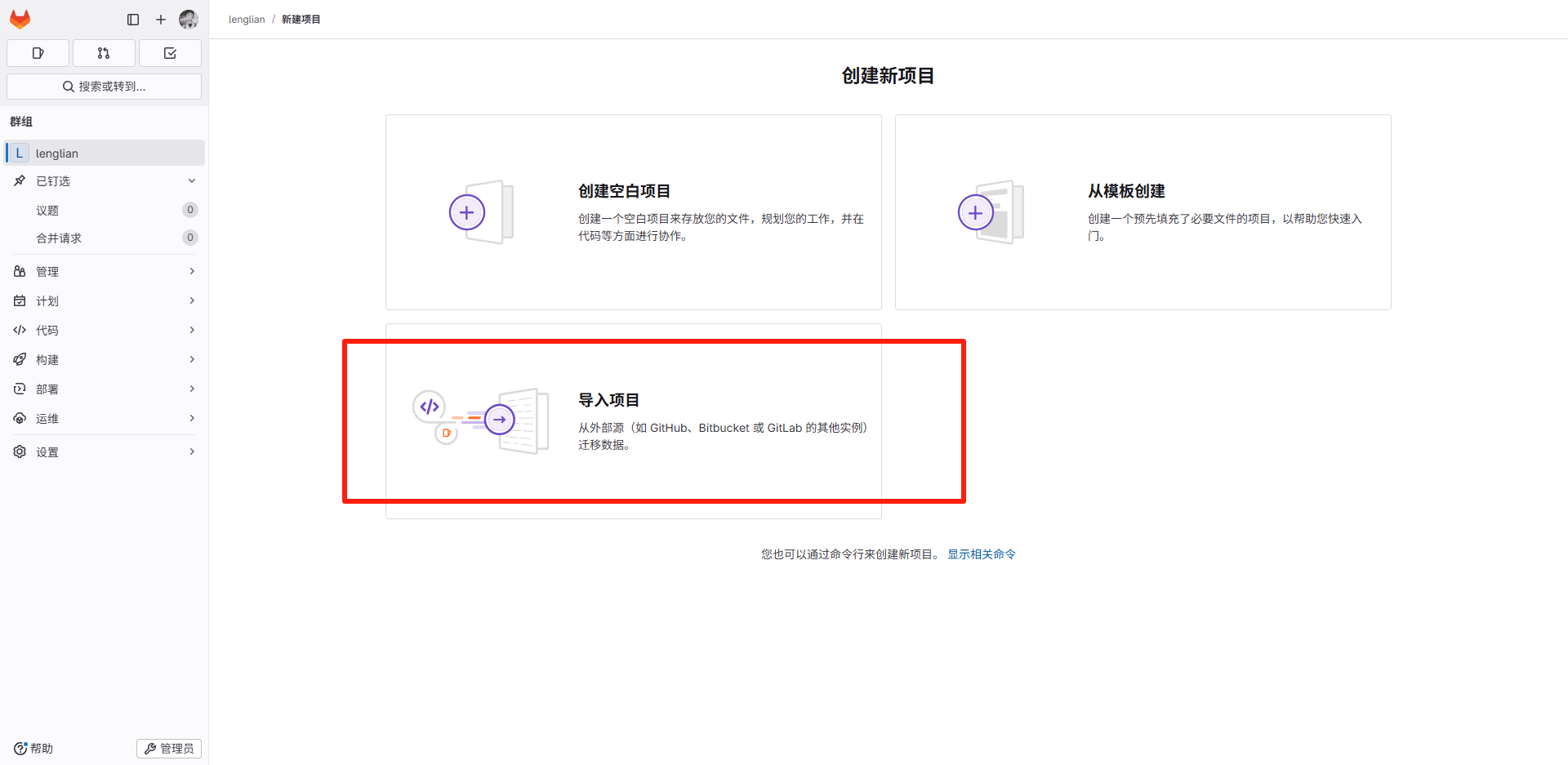
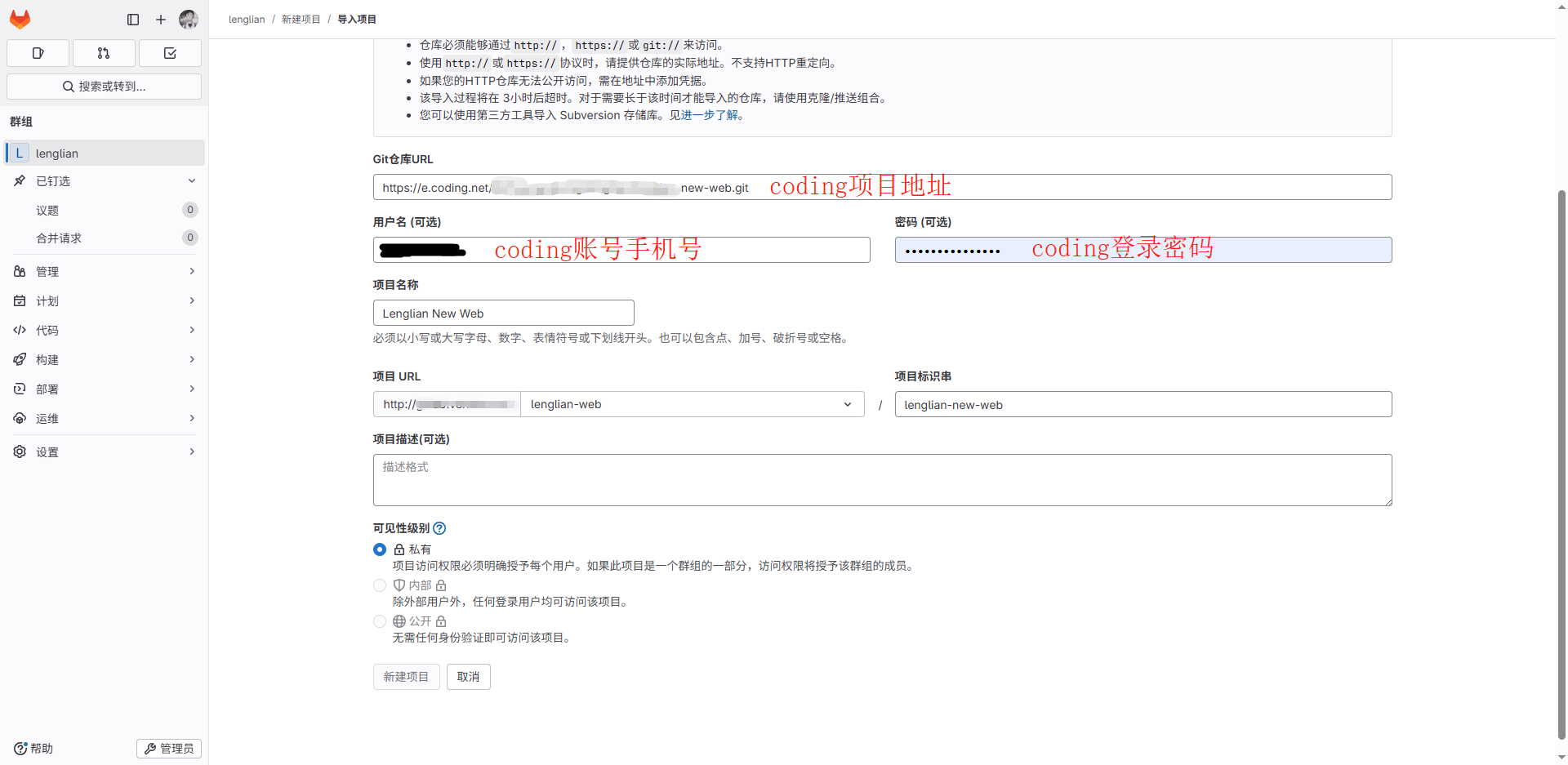
从coding导入
gitlab创建群组

gitlab导入
支持与分享
如果这篇文章对你有帮助,欢迎分享给更多人或打赏支持!
欢迎来到我的博客!
文章
26
分类
10
标签
44
总字数
13,461
运行时长
0 天
最后活动
0 天前
站点域名zhangzhiwu.cn
Fireflyv6.14.5
Astrov7.0.7
Nodev22.22.2
pnpmv9.14.4
构建时间2026年7月24日 11:48:37
系统信息Windows / x86_64
 苏公网安备32021402002558号